Arc Welding Python SDK Usage Examples
Document Conventions
Each section follows this structure:
- Applicable Scenarios — When this scenario applies
- Objective — Desired system state after completing the flow
- Recommended Steps — Ordered operational highlights;
- Common APIs and Types — Quick lookup for SDK symbols, not full parameter tables
- Notes — Common pitfalls
General Programming Conventions
- Obtain an
ArcWeldinginstance viarobot.arcwelding()and call process and welder APIs on it; motion queues remain onrobot. - Every API takes an
ecdict (initialize to{}before the call); after each call checkec['ec']andec['message']. - Weld paths that append to the queue then start usually use
xCoreSDK_python.MotionControlMode.NrtCommandModewithmoveAppend/moveStart; distinguish this from parameter-only flows.
Shared Prerequisites (Common to Sample Code in Each Scenario)
This matches the entry point in the SDK package arcwelding_example.py (platform-specific import, obtaining arc_welding, event watching, etc.).
# -*- coding: utf-8 -*-
import platform
import time
import math
from datetime import timedelta

if platform.system() == "Windows":
    from Release.windows import xCoreSDK_python
    from Release.windows.xCoreSDK_python import arcwelding
    from Release.windows.xCoreSDK_python.EventInfoKey import ArcWeldState, MoveExecution
elif platform.system() == "Linux":
    from Release.linux import xCoreSDK_python
    from Release.linux.xCoreSDK_python import arcwelding
    from Release.linux.xCoreSDK_python.EventInfoKey import ArcWeldState, MoveExecution
else:
    raise ImportError("Unsupported operating system")

ArcWelding = arcwelding.ArcWelding

# 连接机器人后:
ec = {}
robot = xCoreSDK_python.xMateRobot("192.168.0.160")  # 按机型替换
arc_welding = robot.arcwelding()


def print_log(name: str, ec: dict) -> None:
    if ec.get("ec", 0) != 0:
        print(f"{name} failed: ec={ec.get('ec')}, {ec.get('message')}")


def print_info(msg) -> None:
    print(msg)
Scenario 1: Initial Robot and Welder Setup
Applicable Scenarios First-time arc welding on a new workstation, or after replacing the welder / fieldbus setup—confirm the controller and welder side are ready.
Objective Robot connected; arc welding process package available; welder model and communication settings match the site; configure IO and ENI as required.
Recommended Steps
Key-step relationships (aligned with the numbered steps below):
-
connectToRobotconnects to the controller. -
Use
getWelderStatuson the welder side:statevalues such as"disabled"mean no valid link yet;"ok"means ready (exact enums per API reference). -
When already connected: use
getWelderSettingto read protocol, vendormfr, modelmodel, current ratingcurrent_type, etc. -
To replace the welder or reconfigure: call
disconnectFromWelderfirst, then follow the EtherCAT or analog branch below andconnectToWelderagain. -
EtherCAT welders: set
setIsEniHaveWeldtotrue(same meaning as whether a physical welder is connected on the HMI), then upload that welder’s ENI in the HMI. InsetWelder(orWelderSetting), setprotocolto the EtherCAT value (e.g."ethercat"per SDK),mfrto the manufacturer key below,modelto the model key, andcurrent_typeto one tier from that model’scurrent_range(must match the process package). If the model also constrainswire_diameter,shielding_gas,program_number,dry_extension, orfirmware_version, those fields insetWeldermust come only from the allowed sets below.Manufacturer / model / current tiers (and optional constraints) (
mfrandmodelstrings when downloading must match these keys):
{
  "aotai": {
    "RL/RPL": { "current_range": [350, 500, 630, 800] },
    "RP/RPH": { "current_range": [350, 500, 630, 800] }
  },
  "megmeet": {
    "Artsen Plus": { "current_range": [350, 400, 500] },
    "Artsen Pro": { "current_range": [350, 400, 500] },
    "Ehave2": { "current_range": [350, 500, 630] },
    "Artsen3": { "current_range": [400, 500] },
    "Dex2": { "current_range": [350, 400, 500] },
    "Dex2 Ultra": { "current_range": [400] },
    "Megwave": { "current_range": [350, 400, 500] },
    "Megwave 400AC": { "current_range": [400] },
    "MetaTig": { "current_range": [315, 400, 500] },
    "RevoTig": { "current_range": [315, 400, 500] }
  },
  "riland": {
    "TiTans Low Spatter": {
      "current_range": [500],
      "wire_diameter": [0.8, 1.0, 1.2, 1.6],
      "shielding_gas": ["CO2", "80%Ar+20%CO2"]
    },
    "TiTans DP": {
      "current_range": [400, 500, 600],
      "wire_diameter": [0.8, 1.0, 1.2, 1.6],
      "shielding_gas": ["CO2", "80%Ar+20%CO2"]
    }
  },
  "panasonic": {
    "GS6": {
      "current_range": [350, 500],
      "program_number": [1, 97],
      "dry_extension": [10, 12, 15, 20, 25, 30, 35]
    }
  },
  "tayor": {
    "RB-350P": { "current_range": [350] },
    "RB-500P": { "current_range": [500] }
  },
  "headux": {
    "headux": { "current_range": [550] }
  },
  "beijingtime": {
    "time": { "current_range": [1000] }
  },
  "hugong": {
    "NVPM": { "current_range": [500] }
  },
  "ewm": {
    "TIG": { "current_range": [1000], "program_number": [0, 15] },
    "Plasma": { "current_range": [1000], "program_number": [0, 15] },
    "Phoenix": { "current_range": [1000], "program_number": [0, 15] },
    "alpha Q": { "current_range": [1000], "program_number": [0, 15] }
  },
  "bohler": {
    "URANOS NX": {
      "current_range": [3000, 4000, 5000],
      "firmware_version": ["v.14-v.24", "v.25"]
    }
  },
  "esab": {
    "Aristo 500ix": { "current_range": [500] }
  }
}
Example (Aotai RL/RPL, 500 A tier): mfr = "aotai", model = "RL/RPL", current_type = 500 (must be within [350,500,630,800]).
-
Analog welders: complete the following in order, then
setWelder:- ① IO binding: call
setIOSettingto map arc start, wire feed, wire retract, gas check, current/voltage command and feedback, welder ready, fault, etc. to real DI/DO or registers. Verify withgetIOSetting. - ② Current / voltage curves: use
setCurrentCharacteristicCurveData,setVoltageCharacteristicCurveData(andcalculateCurrentCurve/calculateVoltageCurvewhen needed) to create and name curve data on the controller. - ③
setWelder: set protocol to analog (exact string per SDK / process package, e.g."analog");mfrmust be"manual_welding"or"aotai";modelfollows the analog scheme;current_fileandvoltage_fileare the current curve data name and voltage curve data name from step ②. Other fields use defaults or empty per API docs.
- ① IO binding: call
-
Call
connectToWelderto link and enable the welder; usedisconnectFromWelderwhen debugging ends or before swapping welders.
Sample Code
Analog welder setup is in the same sample file as setIOSetting, setCharacteristicCurveData.
    print_info("enter SetWelderAndConnectExample")
    # 设置焊机(方式一)
    arc_welding.setWelder("ethercat", "aotai", "RL/RPL", 500, ec)
    print_log("setWelder", ec)

    # 设置焊机(方式二)
    welder_setting = arcwelding.WelderSetting()
    welder_setting.mfr = "aotai"
    welder_setting.model = "RL/RPL"
    welder_setting.protocol = "ethercat"
    welder_setting.current_type = 500
    welder_setting.current_file = "current1"  # 用于模拟量连接
    welder_setting.voltage_file = "voltage1"  # 用于模拟量连接
    welder_setting.wire_diameter = 1.0
    welder_setting.shielding_gas = "CO2"
    welder_setting.program_number = 10
    welder_setting.dry_extension = 15
    arc_welding.setWelder(welder_setting, ec)
    print_log("setWelder", ec)

    # 读取焊机设置
    welder_setting_ret = arc_welding.getWelderSetting(ec)
    print_log("getWelderSetting", ec)
    print_info(f"mfr: {welder_setting_ret.mfr}")
    print_info(f"model: {welder_setting_ret.model}")
    print_info(f"protocol: {welder_setting_ret.protocol}")
    print_info(f"current_type: {welder_setting_ret.current_type}")
    print_info(f"current_file: {welder_setting_ret.current_file}")
    print_info(f"voltage_file: {welder_setting_ret.voltage_file}")
    print_info(f"wire_diameter: {welder_setting_ret.wire_diameter}")
    print_info(f"shielding_gas: {welder_setting_ret.shielding_gas}")
    print_info(f"program_number: {welder_setting_ret.program_number}")
    print_info(f"dry_extension: {welder_setting_ret.dry_extension}")

    # 连接焊机
    arc_welding.connectToWelder(ec)
    print_log("connectToWelder", ec)

    # 断开焊机
    arc_welding.disconnectFromWelder(ec)
    print_log("disconnectFromWelder", ec)
    print_info("enter SetEniHaveWeldExample")
    # 读取是否连接物理焊机(ENI文件)
    eni_have_weld = arc_welding.isEniHaveWeld(ec)
    print_log("isEniHaveWeld", ec)
    print_info(f"eniHaveWeld: {eni_have_weld}")

    # 设置是否连接物理焊机
    arc_welding.setIsEniHaveWeld(True, ec)
    print_log("setIsEniHaveWeld", ec)
Common APIs and Types
getWelderStatus, getWelderSetting, setWelder, WelderSetting, connectToWelder, disconnectFromWelder, isEniHaveWeld, setIsEniHaveWeld, setIOSetting, getIOSetting, IOSetting, IOData, setCurrentCharacteristicCurveData, setVoltageCharacteristicCurveData, getCurrentCharacteristicCurveData, getVoltageCharacteristicCurveData, calculateCurrentCurve, calculateVoltageCurve
Notes
When changing welder parameters while arc welding is connected, disconnect the welder first before switching welders.
Scenario 2: Welding Runtime Parameters
Applicable Scenarios You need to tune global runtime options tied to welding—dry-run Cartesian speed, manual wire feed/retract speed, gas check time, etc.—distinct from single arc-on/weld named datasets.
Objective ArcWeldRunningParam is written to the controller so dry run, wire feed/retract, and parameterless gas check behave as expected on site.
Recommended Steps
- Build
ArcWeldRunningParam: within process-package limits settest_run_speed(mm/s),wire_feed_speed(m/min),gas_detect_time(s), etc. (semantics and ranges: Appendix: Data Structures, section Running parametersArcWeldRunningParam). - Call
setRunningParamto download; usegetRunningParamto read back and verify. - The parameterless
detectGas()overload ties gas-check duration togas_detect_time; overloads with time and enable follow the arguments you pass (API Description).
Sample Code
    print_info("enter SetRunningParamExample")
    # 下发运行参数
    running_param = arcwelding.ArcWeldRunningParam()
    running_param.test_run_speed = 200
    running_param.wire_feed_speed = 2
    running_param.gas_detect_time = 10
    arc_welding.setRunningParam(running_param, ec)
    print_log("setRunningParam", ec)

    # 读取运行参数
    running_param_ret = arc_welding.getRunningParam(ec)
    print_log("getRunningParam", ec)
    print_info(f"test_run_speed: {running_param_ret.test_run_speed}")
    print_info(f"wire_feed_speed: {running_param_ret.wire_feed_speed}")
    print_info(f"gas_detect_time: {running_param_ret.gas_detect_time}")
Common APIs and Types
setRunningParam, getRunningParam, ArcWeldRunningParam, detectGas
Notes
Manual wire feed/retract speed depends on whether the welder supports that feature.
Scenario 3: Anti-Collision (Torch Collision Detection)
Applicable Scenarios The site uses torch-touch / anti-collision DIs; the program must configure signal name, enable, mute, and countdown, and subscribe to anti-collision state on the host or in logic.
Objective Anti-collision parameters are applied; signal, enable, block, countdown, etc. can be read via query or callbacks and aligned with the HMI or interlocks.
Recommended Steps
- Pick the DI signal name used for anti-collision (e.g.
"DI0_0"). - Call
setAnticollision(signal, enable, block, countdown):enableturns the feature on/off,blockis the mute switch,countdownis the countdown (second-level meaning per process package). - For UI or logic, use
getAnticollisionState, or registersetEventWatcher(xCoreSDK_python.Event.anticollisionState, callback, ec)and parsexCoreSDK_python.EventInfoKey.AnticollisionStatekeys (seeAnticollisionStatein Appendix: Data Structures).
Sample Code
def PrintAnticollisionState(info):
    print_info("enter PrintAnticollisionState")
    signal = info["signal"]
    enable = info["enable"]
    block = info["block"]
    countdown = info["countdown"]
    print_info("anticollision: \n" + f"signale: {signal}\n" +
               f"enable: {enable}\n" + f"block: {block}\n" +
               f"countdown: {countdown}")
    robot.setEventWatcher(xCoreSDK_python.Event.anticollisionState,
                          PrintAnticollisionState, ec)
    print_log("setEventWatcher", ec)

    arc_welding.setAnticollision("DI0_2", True, False, 30, ec)
    print_log("setAnticollision", ec)

    ret = arc_welding.getAnticollisionState(ec)
    print_log("getAnticollisionState", ec)

    print_info("anticollision: \n" + f"signale: {ret.signal}\n" +
               f"enable: {ret.enable}\n" + f"block: {ret.block}\n" +
               f"countdown: {ret.countdown}")
Common APIs and Types
setAnticollision, getAnticollisionState, xCoreSDK_python.Event.anticollisionState, xCoreSDK_python.EventInfoKey.AnticollisionState, setEventWatcher
Notes
Ensure the bound DI signal is not already used by another system function.
Scenario 4: Maintain Named Process Data in Application
Applicable Scenarios Push or edit named process data for arc on, weld, arc off, weave, and segmented weld from a host or offline tool, or keep names aligned with existing entries on the teach pendant HMI.
Objective The controller holds a set of referenceable parameter names for later ArcOnCommand usage or teach programs.
Recommended Steps
- Build the matching structs (
ArcOnData,ArcData,ArcOffData,WeaveData,SegData, …), setnameand process fields. - Call
setXxxDatato write; usegetXxxData(name, ec)to read back and verify. - Remove one entry with
removeXxxData(name); use the list overload for batch delete. - For existing pendant names:
get, edit fields, thensetto overwrite or tweak.
Sample Code
Snippets below cover setArcOnData (arc on), setArcData (weld), setArcOffData (arc off), setWeaveData (weave), and setSegData (segmented weld). Code comes from the matching bodies in arcwelding_example.py (def lines omitted); print helpers such as print_arc_on_data are local functions in that file.
    print_info("enter SetArcOnDataExample")
    # 下发ArcOnData默认值
    arc_on_data_default = arcwelding.ArcOnData()
    arc_welding.setArcOnData(arc_on_data_default, ec)
    print_log("setArcOnData", ec)

    # 下发ArcOnData自定义值
    arc_on_data_custom = arcwelding.ArcOnData()
    arc_on_data_custom.name = "Custom1_name"
    arc_on_data_custom.annotation = "Custom1_annotation"
    arc_on_data_custom.mode = "low_spatter"
    arc_on_data_custom.current_mode = "wire_feed"
    arc_on_data_custom.voltage_mode = "separate"
    arc_on_data_custom.current = 120
    arc_on_data_custom.voltage = 2
    arc_on_data_custom.hold_time = 200
    arc_on_data_custom.detect_time = 500
    arc_on_data_custom.confirm_time = 50
    arc_on_data_custom.preflow_time = 200
    arc_on_data_custom.prearc_time = 50
    arc_on_data_custom.slow_wire_feed_speed = 8
    arc_on_data_custom.pre_wirefeed_time = 10
    arc_on_data_custom.ramp_time = 100
    arc_on_data_custom.re_arcon.enable = True
    arc_on_data_custom.re_arcon.retry_time = 3
    arc_on_data_custom.re_arcon.wire_retract_delay_time = 0
    arc_on_data_custom.re_arcon.wire_retract_time = 100
    arc_on_data_custom.re_arcon.current_step = 10
    arc_on_data_custom.re_arcon.voltage_step = 0.1
    arc_on_data_custom.scratch_arcon.enable = False
    arc_on_data_custom.scratch_arcon.distance = 50
    arc_on_data_custom.scratch_arcon.back_speed = 10
    arc_on_data_custom.scratch_arcon.step = 5
    arc_welding.setArcOnData(arc_on_data_custom, ec)
    print_log("setArcOnData", ec)

    # 获取ArcOnData
    arc_on_data_default_ret = arc_welding.getArcOnData(
        arc_on_data_default.name, ec)
    print_log("getArcOnData", ec)
    arc_on_data_custom_ret = arc_welding.getArcOnData(arc_on_data_custom.name,
                                                      ec)
    print_log("getArcOnData", ec)

    # 打印ArcOnData
    def print_arc_on_data(data: arcwelding.ArcOnData):
        print_info(f"Name: {data.name}")
        print_info(f"Annotation: {data.annotation}")
        print_info(f"Mode: {data.mode}")
        print_info(f"Current Mode: {data.current_mode}")
        print_info(f"Voltage Mode: {data.voltage_mode}")
        print_info(f"Current: {data.current}")
        print_info(f"Voltage: {data.voltage}")
        print_info(f"Hold Time: {data.hold_time}")
        print_info(f"Detect Time: {data.detect_time}")
        print_info(f"Confirm Time: {data.confirm_time}")
        print_info(f"Preflow Time: {data.preflow_time}")
        print_info(f"Prearc Time: {data.prearc_time}")
        print_info(f"Slow Wire Feed Speed: {data.slow_wire_feed_speed}")
        print_info(f"Pre Wirefeed Time: {data.pre_wirefeed_time}")
        print_info(f"Ramp Time: {data.ramp_time}")

        print_info("Re Arc On Parameters:")
        print_info(f"  Enable: {data.re_arcon.enable}")
        print_info(f"  Retry Time: {data.re_arcon.retry_time}")
        print_info(
            f"  Wire Retract Delay Time: {data.re_arcon.wire_retract_delay_time}"
        )
        print_info(f"  Wire Retract Time: {data.re_arcon.wire_retract_time}")
        print_info(f"  Current Step: {data.re_arcon.current_step}")
        print_info(f"  Voltage Step: {data.re_arcon.voltage_step}")

        print_info("Scratch Arc On Parameters:")
        print_info(f"  Enable: {data.scratch_arcon.enable}")
        print_info(f"  Distance: {data.scratch_arcon.distance}")
        print_info(f"  Back Speed: {data.scratch_arcon.back_speed}")
        print_info(f"  Step: {data.scratch_arcon.step}")

    print_arc_on_data(arc_on_data_default_ret)
    print_arc_on_data(arc_on_data_custom_ret)

    # 删除参数
    arc_welding.removeArcOnData("default", ec)
    print_log("removeArcOnData", ec)
    arc_welding.removeArcOnData(["remove1", "remove2"], ec)
    print_log("removeArcOnData", ec)
    print_info("enter SetArcDataExample")
    # 下发ArcData默认值
    arc_data_default = arcwelding.ArcData()
    arc_welding.setArcData(arc_data_default, ec)
    print_log("setArcData", ec)

    # 下发ArcData自定义值
    arc_data_custom = arcwelding.ArcData()
    arc_data_custom.name = "Custom1_name"
    arc_data_custom.annotation = "Custom1_annotation"
    arc_data_custom.mode = "low_spatter"
    arc_data_custom.current_mode = "wire_feed"
    arc_data_custom.voltage_mode = "separate"
    arc_data_custom.current = 80
    arc_data_custom.voltage = 2
    arc_data_custom.weld_speed = 50
    arc_data_custom.ramp_time = 200
    arc_data_custom.arc_break_param.detect_time = 50
    arc_data_custom.arc_break_param.arc_break_option = "stop_and_alarm"
    arc_data_custom.arc_break_param.restart_back_distance = 0
    arc_welding.setArcData(arc_data_custom, ec)
    print_log("setArcData", ec)

    # 获取ArcData
    arc_data_default_ret = arc_welding.getArcData(arc_data_default.name, ec)
    print_log("getArcData", ec)
    arc_data_custom_ret = arc_welding.getArcData(arc_data_custom.name, ec)
    print_log("getArcData", ec)

    # 打印ArcData
    def print_arc_data(data: arcwelding.ArcData):
        print_info(f"Name: {data.name}")
        print_info(f"Annotation: {data.annotation}")
        print_info(f"Mode: {data.mode}")
        print_info(f"Current Mode: {data.current_mode}")
        print_info(f"Voltage Mode: {data.voltage_mode}")
        print_info(f"Current: {data.current}")
        print_info(f"Voltage: {data.voltage}")
        print_info(f"Weld Speed: {data.weld_speed}")
        print_info(f"Ramp Time: {data.ramp_time}")

        print_info("Arc Break Parameters:")
        print_info(f"  Detect Time: {data.arc_break_param.detect_time}")
        print_info(
            f"  Arc Break Option: {data.arc_break_param.arc_break_option}")
        print_info(
            f"  Restart Back Distance: {data.arc_break_param.restart_back_distance}"
        )

    print_arc_data(arc_data_default_ret)
    print_arc_data(arc_data_custom_ret)

    # 删除ArcData
    arc_welding.removeArcData("default", ec)
    print_log("removeArcData", ec)
    arc_welding.removeArcData(["remove1,remove2"], ec)
    print_log("removeArcData", ec)
    print_info("SetArcOffDataExample")
    # 下发ArcOffData
    arc_off_data_default = arcwelding.ArcOffData()  # 默认值
    arc_welding.setArcOffData(arc_off_data_default, ec)
    print_log("setArcOffData", ec)

    arc_off_data_custom = arcwelding.ArcOffData()  # 自定义值
    arc_off_data_custom.name = "Custom1_name"
    arc_off_data_custom.annotation = "Custom1_annotation"
    arc_off_data_custom.mode = "low_spatter"
    arc_off_data_custom.current_mode = "wire_feed"
    arc_off_data_custom.voltage_mode = "separate"
    arc_off_data_custom.current = 160
    arc_off_data_custom.voltage = 5
    arc_off_data_custom.hold_time = 200
    arc_off_data_custom.delay_gasoff_time = 200
    arc_off_data_custom.detect_time = 100
    arc_off_data_custom.retract_time = 80
    arc_off_data_custom.wire_stick_detection_time = 80
    arc_off_data_custom.anti_wire_stick_param.enable = False
    arc_off_data_custom.anti_wire_stick_param.current = 0
    arc_off_data_custom.anti_wire_stick_param.voltage = 0
    arc_off_data_custom.anti_wire_stick_param.time = 100
    arc_welding.setArcOffData(arc_off_data_custom, ec)
    print_log("setArcOffData", ec)

    # 获取ArcOffData
    arc_off_data_default_ret = arc_welding.getArcOffData(
        arc_off_data_default.name, ec)
    print_log("getArcOffData", ec)
    arc_off_data_custom_ret = arc_welding.getArcOffData(
        arc_off_data_custom.name, ec)
    print_log("getArcOffData", ec)

    # 打印ArcOffData
    def print_arc_off_data(data: arcwelding.ArcOffData):
        print_info(f"Name: {data.name}")
        print_info(f"Annotation: {data.annotation}")
        print_info(f"Mode: {data.mode}")
        print_info(f"Current Mode: {data.current_mode}")
        print_info(f"Voltage Mode: {data.voltage_mode}")
        print_info(f"Current: {data.current}")
        print_info(f"Voltage: {data.voltage}")
        print_info(f"Hold Time: {data.hold_time}")
        print_info(f"Delay Gas Off Time: {data.delay_gasoff_time}")
        print_info(f"Detect Time: {data.detect_time}")
        print_info(f"Retract Time: {data.retract_time}")
        print_info(
            f"Wire Stick Detection Time: {data.wire_stick_detection_time}")

        print_info("Anti Wire Stick Parameters:")
        print_info(f"  Enable: {data.anti_wire_stick_param.enable}")
        print_info(f"  Current: {data.anti_wire_stick_param.current}")
        print_info(f"  Voltage: {data.anti_wire_stick_param.voltage}")
        print_info(f"  Time: {data.anti_wire_stick_param.time}")

    print_arc_off_data(arc_off_data_default_ret)
    print_arc_off_data(arc_off_data_custom_ret)

    # 删除ArcOffData
    arc_welding.removeArcOffData("default", ec)
    print_log("removeArcOffData", ec)
    arc_welding.removeArcOffData(["remove1,remove2"], ec)
    print_log("removeArcOffData", ec)
    print_info("enter SetWeaveDataExample")
    # 下发WeaveData
    weave_data_default = arcwelding.WeaveData()  # 默认值
    arc_welding.setWeaveData(weave_data_default, ec)
    print_log("setWeaveData", ec)

    weave_data_custom = arcwelding.WeaveData()  # 自定义值
    weave_data_custom.name = "Custom_name"
    weave_data_custom.annotation = "Custom_annotation"
    weave_data_custom.weaving_reference = "cycle"
    weave_data_custom.pattern = "sine"
    weave_data_custom.weave_length_frequency = 1
    weave_data_custom.amplitude.left = 2
    weave_data_custom.amplitude.right = 2
    weave_data_custom.dwell_type = "weave_stop"
    weave_data_custom.dwell_time = [10, 0, 20]
    weave_data_custom.radius = 5
    weave_data_custom.phase_invert = True
    weave_data_custom.elevation_type = "v_pattern"
    weave_data_custom.elevation_angle.left = 0
    weave_data_custom.elevation_angle.right = 0
    weave_data_custom.inclination_angle = 0
    weave_data_custom.acc = 1
    weave_data_custom.jerk = 10
    arc_welding.setWeaveData(weave_data_custom, ec)
    print_log("setWeaveData", ec)

    # 获取WeaveData
    weave_data_default_ret = arc_welding.getWeaveData(weave_data_default.name,
                                                      ec)
    print_log("getWeaveData", ec)
    weave_data_custom_ret = arc_welding.getWeaveData(weave_data_custom.name,
                                                     ec)
    print_log("getWeaveData", ec)

    # 打印WeaveData
    def print_weave_data(data):
        print_info(f"Name: {data.name}")
        print_info(f"Annotation: {data.annotation}")
        print_info(f"Weaving Reference: {data.weaving_reference}")
        print_info(f"Pattern: {data.pattern}")
        print_info(f"Weave Length Frequency: {data.weave_length_frequency}")

        print_info("Amplitude:")
        print_info(f"  Left: {data.amplitude.left}")
        print_info(f"  Right: {data.amplitude.right}")

        print_info(f"Dwell Type: {data.dwell_type}")
        print_info(
            f"Dwell Time: {data.dwell_time[0]}, {data.dwell_time[1]}, {data.dwell_time[2]}"
        )
        print_info(f"Radius: {data.radius}")
        print_info(f"Phase Invert: {data.phase_invert}")
        print_info(f"Elevation Type: {data.elevation_type}")

        print_info("Elevation Angle:")
        print_info(f"  Left: {data.elevation_angle.left}")
        print_info(f"  Right: {data.elevation_angle.right}")

        print_info(f"Inclination Angle: {data.inclination_angle}")
        print_info(f"Acc: {data.acc}")
        print_info(f"Jerk: {data.jerk}")

    print_weave_data(weave_data_default_ret)
    print_weave_data(weave_data_custom_ret)

    # 删除WeaveData
    arc_welding.removeWeaveData("default", ec)
    print_log("removeWeaveData", ec)
    arc_welding.removeWeaveData(["remove1", "remove2"], ec)
    print_log("removeWeaveData", ec)
    print_info("enter SetSegDataExample")
    # 下发SegData
    seg_data_default = arcwelding.SegData()  # 默认值
    arc_welding.setSegData(seg_data_default, ec)
    print_log("setSegData", ec)

    seg_data_custom = arcwelding.SegData()  # 自定义值
    seg_data_custom.name = "Custom_name"
    seg_data_custom.annotation = "Custom_annotation"
    seg_data_custom.seg_type = "normal"
    seg_data_custom.non_welded_speed = "v10"
    seg_data_custom.welded_distance = 10
    seg_data_custom.non_welded_distance = 20
    arc_welding.setSegData(seg_data_custom, ec)
    print_log("setSegData", ec)

    # 获取SegData
    seg_data_default_ret = arc_welding.getSegData("default", ec)
    print_log("getSegData", ec)
    seg_data_custom_ret = arc_welding.getSegData(seg_data_custom.name, ec)
    print_log("getSegData", ec)

    # 打印SegData
    def print_seg_data(data: arcwelding.SegData):
        print_info(f"Name: {data.name}")
        print_info(f"Annotation: {data.annotation}")
        print_info(f"Segment Type: {data.seg_type}")
        print_info(f"Non-Welded Speed: {data.non_welded_speed}")
        print_info(f"Welded Distance: {data.welded_distance}")
        print_info(f"Non-Welded Distance: {data.non_welded_distance}")

    print_seg_data(seg_data_default_ret)
    print_seg_data(seg_data_custom_ret)

    # 删除SegData
    arc_welding.removeSegData("default", ec)
    print_log("removeSegData", ec)
    arc_welding.removeSegData(["remove1", "remove2"], ec)
    print_log("removeSegData", ec)
Common APIs and Types
Named process-data APIs grouped by set / get / remove (signatures and overloads: API Description, Appendix: Methods).
-
Arc on / weld / arc off / weave / segmented weld
setArcOnData/getArcOnData/removeArcOnDatasetArcData/getArcData/removeArcData,enableArcData
setArcOffData/getArcOffData/removeArcOffData
setWeaveData/getWeaveData/removeWeaveData
setSegData/getSegData/removeSegData
setWeaveAdaptiveData/getWeaveAdaptiveData -
Multi-pass layers
setLayerData/getLayerData/removeLayerData
setLayerCout,MpmlPathCheck,GetLayerStartPoint -
Laser tracking / laser search (named parameters)
setLaserTrackData/getLaserTrackData/removeLaserTrackData
setLaserSearchData/getLaserSearchData/removeLaserSearchData -
Arc tracking (named parameters)
setArcTrackParam/getArcTrackParam/removeArcTrackParam -
Current / voltage characteristic curves (named curve data)
setCurrentCharacteristicCurveData/getCurrentCharacteristicCurveData
setVoltageCharacteristicCurveData/getVoltageCharacteristicCurveData
calculateCurrentCurve,calculateVoltageCurve(compute only, not persisted)
Notes
Reading a missing parameter by name may return a defined error code (e.g. -272); handle it in application logic.
Scenario 5: Welding Mode Selection and Manual / Auto Behavior
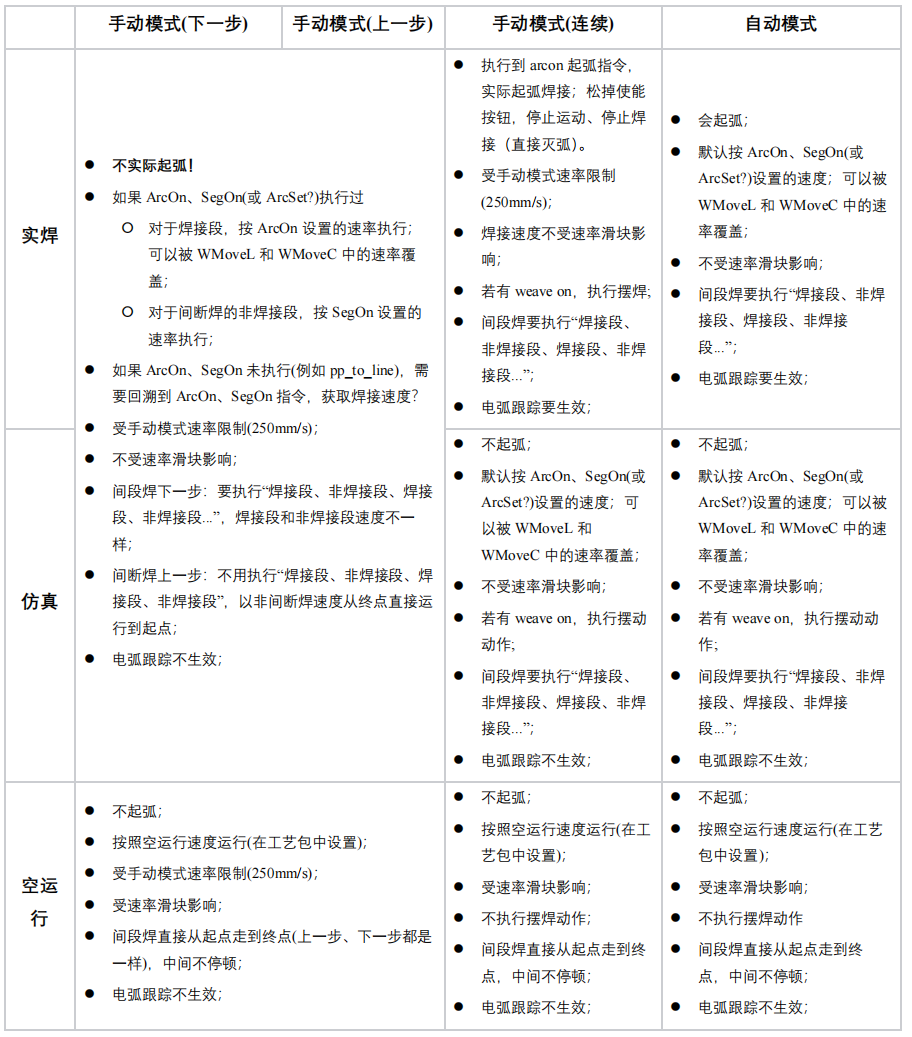
Applicable Scenarios Dry-run path check, simulation for cycle and weave, or real welding with arc—and understand differences under teach pendant manual step, manual continuous, and auto (arc or not, speed slider, segmented weld, weave, arc tracking, etc.).
Objective Welding mode matches the production phase (debug → simulation → real weld).
Recommended Steps
- Call
setWeldModeto switch amongWeldMode::TestRun(dry run),Simu(simulation), andReal(live weld). - Confirm with
getWeldMode. - Compare behavior with the illustration below for how the pendant runs (per process package).
Sample Code
    print_separator("enter SetWeldModeExample")

    weld_mode = arcwelding.WeldMode.TestRun
    arc_welding.setWeldMode(weld_mode, ec)
    print_log("setWeldMode", ec)
    weld_mode_ret = arc_welding.getWeldMode(ec)
    print_log("getWeldMode", ec)
    print_info(f"set: TestRun, return: {weld_mode_ret.name}")
    time.sleep(1)

    weld_mode = arcwelding.WeldMode.Simu
    arc_welding.setWeldMode(weld_mode, ec)
    print_log("setWeldMode", ec)
    weld_mode_ret = arc_welding.getWeldMode(ec)
    print_log("getWeldMode", ec)
    print_info(f"set: Simu, return: {weld_mode_ret.name}")
    time.sleep(1)

    weld_mode = arcwelding.WeldMode.Real
    arc_welding.setWeldMode(weld_mode, ec)
    print_log("setWeldMode", ec)
    weld_mode_ret = arc_welding.getWeldMode(ec)
    print_log("getWeldMode", ec)
    print_info(f"set: Real, return: {weld_mode_ret.name}")
Welding Mode vs. Run Mode (Illustration)
Common APIs and Types
setWeldMode, getWeldMode, arcwelding.WeldMode
Notes
Scenario 6: Typical Seam — Arc On → Linear/Arc Weld → Arc Off
Applicable Scenarios Typical linear or circular seams: under non-real-time command mode, append plain motions and arc commands to one queue in order and start.
Objective The robot runs in order: approach (optional) → arc-on and weld parameters active → weld path with or without weave → arc off.
Recommended Steps
- Enable the welder through Scenario 1 first.
setMotionControlMode(NrtCommand, ec).- Ensure the welder is configured and
connectToWelder(same as Scenario 1). - Build
ArcOnCommandbound to downloaded arc-on and weld parameter names (e.g. same as on the pendant). - Build weld segments:
WMoveLCommand/WMoveCCommand, etc.; - Build
ArcOffCommandbound to the arc-off parameter name. - Call
moveAppendrepeatedly with the same queue id in sequence; after servo on,moveStartruns the queue. - For pause / resume, use
stopandmoveStartagain (see motion control documentation).
Sample Code
print_info("enter ExampleCommand")
    # 以下点位基于CR7
    # 需要先启用焊机
    arc_welding.setWelder("ethercat", "aotai", "RL/RPL", 500, ec)  # 设置焊机
    print_log("setWelder", ec)
    arc_welding.connectToWelder(ec)  # 启用和连接焊机
    print_log("connectToWelder", ec)

    arc_welding.setArcOnData(arcwelding.ArcOnData(), ec)
    arc_welding.setArcData(arcwelding.ArcData(), ec)
    arc_welding.setArcOffData(arcwelding.ArcOffData(), ec)

    arcon = arcwelding.ArcOnCommand("default", "default")
    arcoff = arcwelding.ArcOffCommand("default")

    target = xCoreSDK_python.CartesianPosition(
        [0.315189, -0.15, 0.414397, -math.pi, 0.0, math.pi])
    wml = arcwelding.WMoveLCommand(target, 10, 1, "default")  # 直线摆动

    targetMC = xCoreSDK_python.CartesianPosition()
    targetMC.trans = [0.615167, 0.141585, 0.507386]
    targetMC.rpy = [180.000 * math.pi / 180, 0.0, -167.039 * math.pi / 180]

    auxMC = xCoreSDK_python.CartesianPosition()
    auxMC.trans = [0.583553, 0.134309, 0.628928]
    auxMC.rpy = [
        180.000 * math.pi / 180, 11.286 * math.pi / 180,
        -167.039 * math.pi / 180
    ]
    wmc = arcwelding.WMoveCCommand(targetMC, auxMC, 10, 1, "default")  # 圆弧摆动

    weave_data_default = arcwelding.WeaveData()  # 设置摆动参数
    weave_data_default.amplitude.left = 2
    weave_data_default.amplitude.right = 2
    weave_data_default.weave_length_frequency = 2
    arc_welding.setWeaveData(weave_data_default, ec)

    weaveon = arcwelding.WeaveOnCommand("default")
    weaveoff = arcwelding.WeaveOffCommand()

    robot.setMotionControlMode(
        xCoreSDK_python.MotionControlMode.NrtCommandMode, ec)
    print_log("setMotionControlMode", ec)

    id = xCoreSDK_python.PyString()
    absj = xCoreSDK_python.MoveAbsJCommand(
        target=xCoreSDK_python.JointPosition(
            [PI / 2, PI / 6, -PI / 2, 0, -PI / 3, 0]))
    robot.moveAppend(absj, id, ec)
    robot.moveStart(ec)
    wait_robot(robot, ec)

    robot.moveAppend(arcon, id, ec)
    print_log("moveAppend", ec)

    robot.moveAppend(weaveon, id, ec)
    print_log("moveAppend", ec)

    robot.moveAppend(wml, id, ec)
    print_log("moveAppend", ec)

    robot.moveAppend(weaveoff, id, ec)
    print_log("moveAppend", ec)

    robot.moveAppend(arcoff, id, ec)
    print_log("moveAppend", ec)

    robot.setPowerState(True, ec)
    print_log("setPowerState", ec)

    robot.moveStart(ec)
    print_log("moveStart", ec)

    robot.stop(ec)  # 暂停
    print_log("stop", ec)

    robot.moveStart(ec)  # 继续
    print_log("moveStart", ec)
Common APIs and Types
ArcOnCommand, ArcOffCommand, WMoveLCommand, WMoveCCommand, moveAppend, moveStart, MoveLCommand
Notes
Points, speed, and Conf must match your robot model.
mvoeStart() is non-blocking; avoid exiting the program immediately afterward.
Before arcon and arcoff, you must use ordinary MoveCommand; between them you must use WMoveCommand.
When calling moveAppend(arcon, id, ec), ensure the controller has already stored the arc-on and weld parameters referenced by arcon; do not call setArcOnData on the line just before or adjacent to this moveAppend, or controller latency may cause errors.
For flying arc start (ArcOnData pre-arc time non-zero), prepend a MoveLCommand before arcon.
Scenario 7: Change Process Parameters During Welding with arc_set_opt (ArcSet)
Applicable Scenarios On one seam after arc start, switch a linear or circular segment to another arcdata without dropping the arc or splitting the program.
Objective On queued WMoveLCommand / WMoveCCommand weld moves, use arc_set_opt to name the weld dataset after the switch.
Recommended Steps
- Predefine multiple named datasets with
setArcData(e.g.arcdata1,arcdata2). - Lines:
WMoveLCommand; arcs:WMoveCCommand—setarc_set_opton the command object.
Sample Code
print_info("enter ArcSetExample")
    # 以下点位基于SR5
    cmd_id = xCoreSDK_python.PyString()
    arc_on_command = arcwelding.ArcOnCommand()
    arc_off_command = arcwelding.ArcOffCommand()
    absj = xCoreSDK_python.MoveAbsJCommand(
        target=xCoreSDK_python.JointPosition(
            [0, math.pi / 6, -math.pi / 2, 0, -math.pi / 3, 0]),
        speed=1000)

    l = xCoreSDK_python.MoveLCommand(target=xCoreSDK_python.CartesianPosition(
        [0.614, 0.136, 0.389, -math.pi, 0, math.pi]),
                                     speed=500)
    wml_target1 = xCoreSDK_python.CartesianPosition(
        [0.553, -0.107, 0.309, -math.pi, 0, math.pi])
    wmovel1 = arcwelding.WMoveLCommand(target=wml_target1, speed=500)
    wml_target2 = xCoreSDK_python.CartesianPosition(
        [0.553, 0.107, 0.309, -math.pi, 0, math.pi])
    wmovel2 = arcwelding.WMoveLCommand(target=wml_target2, speed=500)
    wmovel2.arc_set_opt.arc_data = "arcdata1"
    wmovel2.arc_set_opt.ref_start = True
    wmovel2.arc_set_opt.distance = 80

    robot.setPowerState(True, ec)
    print_log("setPowerState", ec)

    robot.moveAppend(absj, cmd_id, ec)
    print_log("moveAppend", ec)

    robot.moveAppend(l, cmd_id, ec)
    print_log("moveAppend", ec)

    robot.moveAppend(arc_on_command, cmd_id, ec)
    print_log("moveAppend", ec)

    wmls = [wmovel1, wmovel2]
    robot.moveAppend(wmovel1, cmd_id, ec)
    robot.moveAppend(wmls, cmd_id, ec)
    print_log("moveAppend", ec)

    robot.moveAppend(arc_off_command, cmd_id, ec)
    print_log("moveAppend", ec)

    robot.moveStart(ec)
    print_log("moveStart", ec)

    input()
    robot.setPowerState(False, ec)
    print_log("setPowerState", ec)
Common APIs and Types
WMoveLCommand::arc_set_opt, WMoveCCommand::arc_set_opt, setArcData
Scenario 8: Linear / Arc Weaving Welding
Applicable Scenarios Fillet or vertical seams need weave on linear or circular segments; amplitude and frequency come from the weave dataset name per the process package.
Objective Weave data is downloaded and bound to weld moves; WeaveOnCommand / WeaveOffCommand can span multiple segments.
Recommended Steps
- Use
setWeaveDatato write the weave dataset name (e.g.weavedata1). - Create
WeaveOnCommandandWeaveOffCommand. - Line: build
WMoveLCommandthen callsetWeaveData("…", ec), or use a constructor overload with weave index (per SDK). - Arc: build
WMoveCCommandand applysetWeaveDatasimilarly; auxiliary point, target, and speed must satisfy robot and process constraints. - Typical sequence:
ArcOnCommand→WeaveOnCommand→ one or moreWMoveL/WMoveC→WeaveOffCommand→ArcOffCommand.
Sample Code
print_info("enter ExampleCommand")
    # 以下点位基于CR7
    # 需要先启用焊机
    arc_welding.setWelder("ethercat", "aotai", "RL/RPL", 500, ec)  # 设置焊机
    print_log("setWelder", ec)
    arc_welding.connectToWelder(ec)  # 启用和连接焊机
    print_log("connectToWelder", ec)

    arc_welding.setArcOnData(arcwelding.ArcOnData(), ec)
    arc_welding.setArcData(arcwelding.ArcData(), ec)
    arc_welding.setArcOffData(arcwelding.ArcOffData(), ec)

    arcon = arcwelding.ArcOnCommand("default", "default")
    arcoff = arcwelding.ArcOffCommand("default")

    target = xCoreSDK_python.CartesianPosition(
        [0.315189, -0.15, 0.414397, -math.pi, 0.0, math.pi])
    wml = arcwelding.WMoveLCommand(target, 10, 1, "default")  # 直线摆动

    targetMC = xCoreSDK_python.CartesianPosition()
    targetMC.trans = [0.615167, 0.141585, 0.507386]
    targetMC.rpy = [180.000 * math.pi / 180, 0.0, -167.039 * math.pi / 180]

    auxMC = xCoreSDK_python.CartesianPosition()
    auxMC.trans = [0.583553, 0.134309, 0.628928]
    auxMC.rpy = [
        180.000 * math.pi / 180, 11.286 * math.pi / 180,
        -167.039 * math.pi / 180
    ]
    wmc = arcwelding.WMoveCCommand(targetMC, auxMC, 10, 1, "default")  # 圆弧摆动

    weave_data_default = arcwelding.WeaveData()  # 设置摆动参数
    weave_data_default.amplitude.left = 2
    weave_data_default.amplitude.right = 2
    weave_data_default.weave_length_frequency = 2
    arc_welding.setWeaveData(weave_data_default, ec)

    weaveon = arcwelding.WeaveOnCommand("default")
    weaveoff = arcwelding.WeaveOffCommand()

    robot.setMotionControlMode(
        xCoreSDK_python.MotionControlMode.NrtCommandMode, ec)
    print_log("setMotionControlMode", ec)

    id = xCoreSDK_python.PyString()
    absj = xCoreSDK_python.MoveAbsJCommand(
        target=xCoreSDK_python.JointPosition(
            [PI / 2, PI / 6, -PI / 2, 0, -PI / 3, 0]))
    robot.moveAppend(absj, id, ec)
    robot.moveStart(ec)
    wait_robot(robot, ec)

    robot.moveAppend(arcon, id, ec)
    print_log("moveAppend", ec)

    robot.moveAppend(weaveon, id, ec)
    print_log("moveAppend", ec)

    robot.moveAppend(wml, id, ec)
    print_log("moveAppend", ec)

    robot.moveAppend(weaveoff, id, ec)
    print_log("moveAppend", ec)

    robot.moveAppend(arcoff, id, ec)
    print_log("moveAppend", ec)

    robot.setPowerState(True, ec)
    print_log("setPowerState", ec)

    robot.moveStart(ec)
    print_log("moveStart", ec)

    robot.stop(ec)  # 暂停
    print_log("stop", ec)

    robot.moveStart(ec)  # 继续
    print_log("moveStart", ec)
Common APIs and Types
setWeaveData, WMoveLCommand, WMoveCCommand, WeaveOnCommand, WeaveOffCommand
Notes
- Paths that need weave must lie between
WeaveOnCommandandWeaveOffCommand; setting weave parameters only onWMoveLCommand/WMoveCCommandwithout those commands has no effect. - Between
WeaveOnCommandandWeaveOffCommand, segments without their own weave parameters still run using the weave settings fromWeaveOnCommand.
Scenario 9: Linear / Arc Segmented Welding
Applicable Scenarios Only part of the path needs a "weld–pause–weld" rhythm; weave is not required, or other segments handle weave separately.
Objective Between SegOnCommand and SegOffCommand, WMoveL / WMoveC follow the segmented rhythm from SegData; outside that interval use continuous weld or ordinary weld moves.
Recommended Steps
- Use
setSegDatafor the segmented weld dataset name (e.g.segdata1). - Queue:
ArcOnCommand→ (optional dry moves or non-segment sections) →SegOnCommand("segdata1")→ one or more line/circular weld moves →SegOffCommand→ further continuous weld or arc off.
Sample Code
    print_info("enter segOnExample")
    # 以下点位基于SR5
    # 根据起始轴角度,计算笛卡尔位姿
    drag_posture = [0, math.pi / 6, -math.pi / 2, 0, -math.pi / 3, 0]
    p_start = robot.model().calcFk(drag_posture, ec)
    print_info(f"start pose: {p_start}")

    # 设置间断焊参数
    seg_data = arcwelding.SegData()
    seg_data.name = "segdata1"
    seg_data.annotation = "segannotation"
    seg_data.seg_type = "normal"
    seg_data.non_welded_speed = "v5"
    seg_data.welded_distance = 15
    seg_data.non_welded_distance = 30
    arc_welding.setSegData(seg_data, ec)
    # 开始间断焊指令,设置间断焊参数为segdata1
    seg_on_cmd = arcwelding.SegOnCommand("segdata1")
    seg_off_cmd = arcwelding.SegOffCommand()
    # 几条焊接运动指令
    seg_wmovel0 = arcwelding.WMoveLCommand(target=p_start, speed=2000, zone=0)
    seg_wmovel0.offset.type = xCoreSDK_python.CartesianPositionOffsetType.offs
    seg_wmovel0.offset.frame.trans = [0, -0.11, -0.12]
    seg_wmovel1 = arcwelding.WMoveLCommand(target=p_start, speed=20, zone=0)
    seg_wmovel1.offset.type = xCoreSDK_python.CartesianPositionOffsetType.offs
    seg_wmovel1.offset.frame.trans = [0, 0.08, -0.02]
    seg_wmc = arcwelding.WMoveCCommand(target=p_start,
                                       aux=p_start,
                                       speed=10,
                                       zone=0)
    seg_wmc.targetOffset.type = xCoreSDK_python.CartesianPositionOffsetType.offs
    seg_wmc.targetOffset.frame.trans = [0, -0.05, 0.01]
    seg_wmc.auxOffset.type = xCoreSDK_python.CartesianPositionOffsetType.offs
    seg_wmc.auxOffset.frame.trans = [0, 0.070, 0]

    non_seg_wmovl = arcwelding.WMoveLCommand(target=p_start, speed=20, zone=1)
    non_seg_wmovl.offset.type = xCoreSDK_python.CartesianPositionOffsetType.offs
    non_seg_wmovl.offset.frame.trans = [-0.05, 0, 0]

    arc_on_cmd = arcwelding.ArcOnCommand("arcondata1", "arcdata1")
    arc_off_cmd = arcwelding.ArcOffCommand("arcoffdata1")
    absj = xCoreSDK_python.MoveAbsJCommand(
        target=xCoreSDK_python.JointPosition(
            [0, math.pi / 6, -math.pi / 2, 0, -math.pi / 3, 0]),
        speed=500)
    weave_on_command = arcwelding.WeaveOnCommand("weavedata1")
    weave_off_cmd = arcwelding.WeaveOffCommand()

    id = xCoreSDK_python.PyString()
    robot.setPowerState(True, ec)
    robot.moveAppend(absj, id, ec)
    robot.moveStart(ec)
    while True:
        time.sleep(1)
        st = robot.operationState(ec)
        if st == xCoreSDK_python.OperationState.idle or st == xCoreSDK_python.OperationState.unknown:
            break
    print_info("运动到初始点")

    robot.moveAppend(arc_on_cmd, id, ec)
    robot.moveAppend(weave_on_command, id, ec)
    robot.moveAppend(seg_on_cmd, id, ec)
    wmovels = [seg_wmovel0, seg_wmovel1]
    robot.moveAppend(wmovels, id, ec)
    robot.moveAppend(seg_wmc, id, ec)
    robot.moveAppend(seg_off_cmd, id, ec)
    robot.moveAppend(non_seg_wmovl, id, ec)
    robot.moveAppend(weave_off_cmd, id, ec)
    robot.moveAppend(arc_off_cmd, id, ec)
    robot.moveStart(ec)
Common APIs and Types
setSegData, SegOnCommand, SegOffCommand, WMoveLCommand, WMoveCCommand
Scenario 10: Linear / Arc Segmented Welding with Weaving
Applicable Scenarios Segmented rhythm and weave apply together within the same arc interval.
Objective WeaveOn wrapping and the SegOn–SegOff span are ordered correctly in the queue, and arc_set_opt, offsets, etc. on each WMoveL / WMoveC match site calibration.
Recommended Steps
- Apply both
setWeaveDataandsetSegData. - Typical order (see
segOnExample):ArcOnCommand→WeaveOnCommand→ optional non-segment transitionWMoveL→SegOnCommand→ multipleWMoveL/WMoveCinside the segment window →SegOffCommand→ further moves →WeaveOffCommand→ArcOffCommand. - If segment and continuous sections use different weld data, set
arc_set_opton the corresponding commands. - For circular segments, configure target/aux offsets on
offset/targetOffsetetc. like the sample (per SDK stubs / API docs).
Sample Code
    print_info("enter segOnExample")
    # 以下点位基于SR5
    # 根据起始轴角度,计算笛卡尔位姿
    drag_posture = [0, math.pi / 6, -math.pi / 2, 0, -math.pi / 3, 0]
    p_start = robot.model().calcFk(drag_posture, ec)
    print_info(f"start pose: {p_start}")

    # 设置间断焊参数
    seg_data = arcwelding.SegData()
    seg_data.name = "segdata1"
    seg_data.annotation = "segannotation"
    seg_data.seg_type = "normal"
    seg_data.non_welded_speed = "v5"
    seg_data.welded_distance = 15
    seg_data.non_welded_distance = 30
    arc_welding.setSegData(seg_data, ec)
    # 开始间断焊指令,设置间断焊参数为segdata1
    seg_on_cmd = arcwelding.SegOnCommand("segdata1")
    seg_off_cmd = arcwelding.SegOffCommand()
    # 几条焊接运动指令
    seg_wmovel0 = arcwelding.WMoveLCommand(target=p_start, speed=2000, zone=0)
    seg_wmovel0.offset.type = xCoreSDK_python.CartesianPositionOffsetType.offs
    seg_wmovel0.offset.frame.trans = [0, -0.11, -0.12]
    seg_wmovel1 = arcwelding.WMoveLCommand(target=p_start, speed=20, zone=0)
    seg_wmovel1.offset.type = xCoreSDK_python.CartesianPositionOffsetType.offs
    seg_wmovel1.offset.frame.trans = [0, 0.08, -0.02]
    seg_wmc = arcwelding.WMoveCCommand(target=p_start,
                                       aux=p_start,
                                       speed=10,
                                       zone=0)
    seg_wmc.targetOffset.type = xCoreSDK_python.CartesianPositionOffsetType.offs
    seg_wmc.targetOffset.frame.trans = [0, -0.05, 0.01]
    seg_wmc.auxOffset.type = xCoreSDK_python.CartesianPositionOffsetType.offs
    seg_wmc.auxOffset.frame.trans = [0, 0.070, 0]

    non_seg_wmovl = arcwelding.WMoveLCommand(target=p_start, speed=20, zone=1)
    non_seg_wmovl.offset.type = xCoreSDK_python.CartesianPositionOffsetType.offs
    non_seg_wmovl.offset.frame.trans = [-0.05, 0, 0]

    arc_on_cmd = arcwelding.ArcOnCommand("arcondata1", "arcdata1")
    arc_off_cmd = arcwelding.ArcOffCommand("arcoffdata1")
    absj = xCoreSDK_python.MoveAbsJCommand(
        target=xCoreSDK_python.JointPosition(
            [0, math.pi / 6, -math.pi / 2, 0, -math.pi / 3, 0]),
        speed=500)
    weave_on_command = arcwelding.WeaveOnCommand("weavedata1")
    weave_off_cmd = arcwelding.WeaveOffCommand()

    id = xCoreSDK_python.PyString()
    robot.setPowerState(True, ec)
    robot.moveAppend(absj, id, ec)
    robot.moveStart(ec)
    while True:
        time.sleep(1)
        st = robot.operationState(ec)
        if st == xCoreSDK_python.OperationState.idle or st == xCoreSDK_python.OperationState.unknown:
            break
    print_info("运动到初始点")

    robot.moveAppend(arc_on_cmd, id, ec)
    robot.moveAppend(weave_on_command, id, ec)
    robot.moveAppend(seg_on_cmd, id, ec)
    wmovels = [seg_wmovel0, seg_wmovel1]
    robot.moveAppend(wmovels, id, ec)
    robot.moveAppend(seg_wmc, id, ec)
    robot.moveAppend(seg_off_cmd, id, ec)
    robot.moveAppend(non_seg_wmovl, id, ec)
    robot.moveAppend(weave_off_cmd, id, ec)
    robot.moveAppend(arc_off_cmd, id, ec)
    robot.moveStart(ec)
Common APIs and Types
Combine the types listed under Scenario 8 and Scenario 9.
Notes
Scenario 11: Pendulum Path Welding
Applicable Scenarios Seam geometry is defined by the process as a pendulum path (dedicated pendulum motion commands).
Objective Use start, auxiliary, target, speed, etc. on WMoveLPendulumCommand correctly; set arc_set_opt on the command when switching weld specs.
Recommended Steps
- Fill in
WMoveLPendulumCommandpoints per process package and teach data (same asarcSetPendulumExample). - Combine with
ArcOnCommand/ArcOffCommandlike ordinary weld moves, append to the non-real-time queue, thenmoveStart. - If the same program also uses regular weave, distinguish from Scenario 8: pendulum is a separate motion type; generally do not wrap the same pendulum segment with
WeaveOn(per process package).
Sample Code
# 示例 - 焊接钟摆过程中设置焊接参数(点位需按机型标定)
cmd_id = xCoreSDK_python.PyString()

arc_data = arcwelding.ArcData()
arc_data.name = "arcdata1"
arc_welding.setArcData(arc_data, ec)

arc_data.name = "arcdata2"
arc_data.current = 20
arc_data.voltage = 15
arc_welding.setArcData(arc_data, ec)

arc_data.name = "arcdata3"
arc_data.current = 100
arc_data.voltage = 20
arc_data.weld_speed = 15
arc_welding.setArcData(arc_data, ec)

arcon_data = arcwelding.ArcOnData()
arcon_data.name = "arcondata1"
arc_welding.setArcOnData(arcon_data, ec)

arcoff_data = arcwelding.ArcOffData()
arcoff_data.name = "arcoffdata1"
arc_welding.setArcOffData(arcoff_data, ec)

weave_data = arcwelding.WeaveData()
weave_data.weave_length_frequency = 3.5
weave_data.amplitude.left = 6
weave_data.amplitude.right = 4.5
arc_welding.setWeaveData(weave_data, ec)

arc_on_command = arcwelding.ArcOnCommand("arcondata1", "arcdata1")
arc_off_command = arcwelding.ArcOffCommand("arcoffdata1")

absj = xCoreSDK_python.MoveAbsJCommand(
    [0.168, 0.369, -0.883, -0.210, -0.637, -0.137], 1000)
start1 = xCoreSDK_python.CartesianPosition(
    [0.68015, -0.077702, 0.777555, -2.319, 1.112, -2.228])
start_aux1 = xCoreSDK_python.CartesianPosition(
    [0.672849, -0.0777043, 0.777555, -2.319, 1.112, -2.228])
target_aux1 = xCoreSDK_python.CartesianPosition(
    [0.647849, -0.0943, 0.750882, -2.319, 1.112, -2.228])
target1 = xCoreSDK_python.CartesianPosition(
    [0.647849, -0.09473, 0.747882, -2.319, 1.112, -2.228])
target_aux2 = xCoreSDK_python.CartesianPosition(
    [0.437346, -0.2597, 0.793403, -2.319, 1.112, -2.228])
target2 = xCoreSDK_python.CartesianPosition(
    [0.435346, -0.2597, 0.796403, -2.319, 1.112, -2.228])
target_aux3 = xCoreSDK_python.CartesianPosition(
    [0.6117849, -0.14534, 0.666882, -2.319, 1.112, -2.228])
target3 = xCoreSDK_python.CartesianPosition(
    [0.599849, -0.14574, 0.667882, -2.319, 1.112, -2.228])

l = xCoreSDK_python.MoveLCommand(start1, 500)
wp1 = arcwelding.WMoveLPendulumCommand(start_aux1, target1, target_aux1, 20, 0.5, 100, 2)
wp2 = arcwelding.WMoveLPendulumCommand(None, target2, target_aux2, 20, 3, 234, 1)
wp2.arc_set_opt.arc_data = "arcdata2"
wp2.arc_set_opt.ref_start = True
wp2.arc_set_opt.distance = 0
wp3 = arcwelding.WMoveLPendulumCommand(None, target3, target_aux3, -1, 3.1, 4, 5)
wp3.arc_set_opt.arc_data = "arcdata3"
wp3.arc_set_opt.ref_start = True
wp3.arc_set_opt.distance = 0

robot.setPowerState(True, ec)
robot.moveAppend(absj, cmd_id, ec)
robot.moveAppend(l, cmd_id, ec)
robot.moveAppend(arc_on_command, cmd_id, ec)
robot.moveAppend(wp1, cmd_id, ec)
robot.moveAppend(wp2, cmd_id, ec)
robot.moveAppend(wp3, cmd_id, ec)
robot.moveAppend(arc_off_command, cmd_id, ec)
robot.moveStart(ec)
input()
robot.setPowerState(False, ec)
Common APIs and Types
WMoveLPendulumCommand, ArcSetOpt (arc_set_opt member)
Scenario 12: Arc Tracking
Applicable Scenarios During welding, correct lateral or height using arc sensing.
Objective Selected path segments use a given ArcTrackParam; omit the tracking name on other segments for no tracking.
Recommended Steps
- Use
setArcTrackParamto download the tracking dataset name (e.g.arctrackdata1). - Pass the tracking data name in
WMoveLCommandoverloads that include weave names; arcs use the same binding if an equivalent overload exists (per stubs / API docs). - Typical queue:
ArcOnCommand→WeaveOnCommand→ multiple tracked weld moves →WeaveOffCommand→ArcOffCommand. - Wait for motion to finish and arc-off to complete (optionally combine with Scenario 18 event subscription).
Sample Code
def arc_track_example(robot: xCoreSDK_python.BaseRobot,
                            arc_welding: ArcWelding, ec):
    # 设置电弧跟踪参数
    param = arcwelding.ArcTrackParam()
    param.name = "arctrackdata1"
    param.annotation = "test1"
    param.delay_time = 5 # 其他的值类似设置就行,这里直接使用默认值
    arc_welding.setArcTrackParam(param,ec)

    # 获取对应的电弧跟踪参数
    param_get = arc_welding.getArcTrackParam(param.name, ec)
    print(f"name: {param_get.name} annotation: {param_get.annotation} delay_time: {param_get.delay_time}")

    # 本例验证时运行于NB4h-R580-3B(注意点位匹配)
    p0 = [0.357487, 0.000633967, 0.222628, 3.0, 0.0685018, 3.12448]
    p1 = [0.357487, 0.143835, 0.222628, 3.13197, 0.0685018, 3.12448]
    p2 = [0.456268, 0.000634313, 0.222628, 3.13197, 0.0685026, 3.12448]
    p3 = [0.456268, 0.143835, 0.222628, 3.13197, 0.0685024, 3.12448]
    p4 = [0.456268, -0.103198, 0.222628, 3.13197, 0.068502, 3.12448]

    arcon = arcwelding.ArcOnCommand("arcondata1", "arcdata1")
    arcoff = arcwelding.ArcOffCommand("arcoffdata1")
    mj = xCoreSDK_python.MoveJCommand(p0, 100, 1)

    # 第一条,开启电弧跟踪,用跟踪参数arctrackdata1
    wml1 = arcwelding.WMoveLCommand(p1, 20, 1, "weavedata1", "arctrackdata1")
    # 第二条,开启电弧跟踪,用跟踪参数arctrackdata2
    wml2=arcwelding.WMoveLCommand (p2, 20, 1, "weavedata1", "arctrackdata2")
    # 第三条,电弧跟踪参数为空,不跟踪
    wml3=arcwelding.WMoveLCommand (p3, 20, 1, "weavedata1")
    # 第四条和第五条,开启电弧跟踪,用跟踪参数arctrackdata2
    wml4=arcwelding.WMoveLCommand (p4, 20, 1, "weavedata1", "arctrackdata2")
    wml5=arcwelding.WMoveLCommand (p3, 20, 1, "weavedata1", "arctrackdata2")
    # 第六条,不跟踪
    wml6=arcwelding.WMoveLCommand (p2, 20, 1, "weavedata1") # 直线摆动
    weaveon=arcwelding.WeaveOnCommand ("weavedata1")
    weaveoff=arcwelding.WeaveOffCommand()
    wmove_list = [wml1, wml2, wml3, wml4, wml5, wml6]

    id = xCoreSDK_python.PyString()
    move_id = xCoreSDK_python.PyString()
    robot.setPowerState(True, ec)
    robot.moveAppend(mj, move_id, ec)
    robot.moveAppend(arcon, id, ec)
    if(ec["ec"]!=0):
        print(f"{inspect.currentframe().f_lineno}: {ec["message"]}")
    robot.moveAppend(weaveon, id, ec)
    if(ec["ec"]!=0):
        print(f"{inspect.currentframe().f_lineno}: {ec["message"]}")
    robot.moveAppend(wmove_list, move_id, ec)
    if(ec["ec"]!=0):
        print(f"{inspect.currentframe().f_lineno}: {ec["message"]}")
    robot.moveAppend(weaveoff, id, ec)
    if(ec["ec"]!=0):
        print(f"{inspect.currentframe().f_lineno}: {ec["message"]}")
    robot.moveAppend(arcoff, id, ec)
    if(ec["ec"]!=0):
        print(f"{inspect.currentframe().f_lineno}: {ec["message"]}")
    robot.moveStart(ec)
    if(ec["ec"]!=0):
        print(f"{inspect.currentframe().f_lineno}: {ec["message"]}")

    from move_example import waitForFinish
    waitForFinish(robot, move_id.content(), len(wmove_list) - 1)
    while -1 != robot.queryEventInfo(xCoreSDK_python.Event.arcWeldState)[xCoreSDK_python.EventInfoKey.ArcWeldState.ArcWelding]:
        # waiting for arc off
        time.sleep(0.01)  # 10 milliseconds
    print("Finish running")
Common APIs and Types
setArcTrackParam, getArcTrackParam, WMoveLCommand (overload with tracking parameter), ArcOnCommand, WeaveOnCommand, WeaveOffCommand, ArcOffCommand
Notes
Tracking quality depends on welder, wire, current waveform, and robot model; re-teach poses on your robot. Arc tracking requires weave to be enabled.
Scenario 13: Laser Search
Applicable Scenarios Before or during the main weld program, laser measurement yields pose corrections for the seam or features.
Objective LaserSearchData is applied; executeLaserSearch returns within the timeout; hand–eye data names match those referenced in the command.
Recommended Steps
- Baseline setup for sensor network, hand–eye, and device connection is in Scenario 14 (
LaserSensorCfg,setHandeyeData,connLaserSensorDev, etc.). - Use
setLaserSearchDatafor search dataset names and process-package fields. - Build
LaserSearchCommand(hand–eye name, search dataset name, search pose, speed, …) and callexecuteLaserSearch; sync/async, timeout, and thread safety are up to the application.
Sample Code
# 保存手眼标定参数
    handeyedata0 = arcwelding.HandeyeData()
    handeyedata0.mode = True
    handeyedata0.xyz_abc = [29.456, -14.151, 70.047, 4.5006 / 180.0 * math.pi, 4.0438 / 180.0 * math.pi, -97.358 / 180.0 * math.pi]
    handeyedata0.name = "laserhandeyedata1"
    arc_welding.setHandeyeData(handeyedata0, ec)
    print(f"ec: {ec["ec"]}, {ec["message"]}")
    # 保存寻位参数
    laser_search_data = arcwelding.LaserSearchData()
    laser_search_data.name = "lasersearchdata1"
    laser_search_data.job_number =2
    laser_search_data.search_type ="point"
    laser_search_data.search_mode ="continuous"
    laser_search_data.step_length = 3
    laser_search_data.joint_type = "lap_joint"
    arc_welding.setLaserSearchData(laser_search_data, ec)
    print(f"ec: {ec["ec"]}, {ec["message"]}")

    laser_search_pos = xCoreSDK_python.CartesianPosition()
    laser_search_pos.rpy = [3.14, 0, 3.14]
    laser_search_pos.trans = [0.563, 0.3, 0.43]
    laser_search_cmd = arcwelding.LaserSearchCommand("laserhandeyedata1", "lasersearchdata1", laser_search_pos, 10, 0)
    is_found = False
    pos = xCoreSDK_python.CartesianPosition()
    ret = None
    robot.setPowerState(True, ec)

    # 示例中选择同步等待寻位结果,设置超时时间为 30 秒。可根据轨迹速度和长度来设置超时时间。
    timeout = 30
    # 二、寻位并运动
    robot.moveReset(ec)
    ret = arc_welding.executeLaserSearch(laser_search_cmd, True, timedelta(seconds=timeout), ec)
    print(f"ec: {ec["ec"]}, {ec["message"]}")
    is_found = ret[0]
    pos = ret[1]
    print(f"isFound: {is_found}, pos: {', '.join(map(str, pos.trans))}, rpy: {', '.join(map(str, pos.rpy))}")
Common APIs and Types
setLaserSearchData, LaserSearchCommand, executeLaserSearch, HandeyeData (name referenced in the command)
Scenario 14: Laser Tracking — Sensor Setup, Connection, and Queue Usage
Applicable Scenarios Maintain laser IP, cycle, and type on the host; connect the device; seam tracking.
Objective Device connectable and observable; within the tracking segment LaserTrackOnCommand–LaserTrackOffCommand share the queue with weld moves.
Recommended Steps (Configuration and Connection)
- Fill
LaserSensorCfg, callsetLaserSensorCfg; optionallysetEventWatcher(xCoreSDK_python.Event.lasertrackState, …). connLaserSensorDev/disconnLaserSensorDev; when unused,removeLaserSensorCfg.- Hand–eye:
setHandeyeData/getHandeyeData; auto calibration:startHandeyeCalibration→calibratePoint→calibrateEnd. - Tracking dataset name:
setLaserTrackData(fields per process package).
Recommended Steps (Seam Tracking Queue)
- After connecting the device,
openLaserTrack("sensor1", ec). - Queue:
ArcOnCommand→LaserTrackOnCommand→WMoveL/WMoveC, etc. →LaserTrackOffCommand→ArcOffCommand. closeLaserTrack, thendisconnLaserSensorDevper procedure.
Sample Code
In order, from the same sample file: PrintLaserSensorState, set_laser_sensor_state_watcher (registers callbacks for the configuration example), laser_track_example, laser_track_command_example (check ec after calls; when motion completes you can use move_example.waitForFinish).
def PrintLaserSensorState(info):
    print_info("enter PrintLaserSensorState")
    device_name = info["device_name"]
    connect = info["connect"]
    laser_on = info["laser_state"]
    power_on = info["power_state"]  # 注意:明图传感器没有使能状态,这里的使能状态无效

    print_info("[激光跟踪器状态信息] 设备名称: " + device_name + " 连接:" +
               ("YES " if connect else "NO ") + "激光开启:" +
               ("YES " if laser_on else "NO ") + "使能开启:" +
               ("YES " if power_on else "NO "))
    print_info("enter SetLaserSensorStateWatcher")
    robot.setEventWatcher(xCoreSDK_python.Event.lasertrackState,
                          PrintLaserSensorState, ec)
    print_log("setEventWatcher", ec)
    print_info("enter LaserTrackExample")
    # 设置激光跟踪器配置信息
    cfg = arcwelding.LaserSensorCfg()
    cfg.name = "sensor1"
    cfg.ip = "192.168.110.92"
    cfg.port = 502
    cfg.overtime = 800
    cfg.communication_cycle = 60
    cfg.type = arcwelding.LaserSensorType.CRNT  # 创想传感器
    # cfg.type = arcwelding.LaserSensorType.SMART_IMAGE  # 明图传感器

    # 发送指令设置AddLaserSensorCfg
    arc_welding.setLaserSensorCfg(cfg, ec)
    print_log("setLaserSensorCfg", ec)

    # 查询设备配置信息
    cfg_get = arc_welding.getLaserSensorCfg(cfg.name, ec)
    print_log("getLaserSensorCfg", ec)
    print_info("name: " + cfg_get.name + "  ip:" + cfg_get.ip)

    # 设置传感器状态监控watch
    set_laser_sensor_state_watcher(robot, ec)

    # 连接激光跟踪器ConnLaserTrack
    arc_welding.connLaserSensorDev(cfg.name, ec)
    print_log("connLaserSensorDev", ec)

    # 开启焊缝跟踪器,开始获取激光传感器数据OpenLaserTrack
    arc_welding.openLaserTrack(cfg.name, ec)
    print_log("openLaserTrack", ec)

    # 关闭焊缝跟踪器CloseLaserTrack
    arc_welding.closeLaserTrack(cfg.name, ec)
    print_log("closeLaserTrack", ec)

    # 断开连接DisConnLaserTrack
    arc_welding.disconnLaserSensorDev(cfg.name, ec)
    print_log("disconnLaserSensorDev", ec)

    # 删除设备配置信息RemoveLaserSensorCfg
    arc_welding.removeLaserSensorCfg(cfg.name, ec)
    print_log("removeLaserSensorCfg", ec)

    # 设置手眼标定结果
    handeyedata0 = arcwelding.HandeyeData()
    handeyedata0.mode = True
    handeyedata0.xyz_abc = [
        29.456, -14.151, 70.047, 4.5006 / 180.0 * math.pi,
        4.0438 / 180.0 * math.pi, -97.358 / 180.0 * math.pi
    ]
    handeyedata0.name = "handeyedata0"
    arc_welding.setHandeyeData(handeyedata0, ec)
    print_log("setHandeyeData", ec)

    # 查询手眼标定结果
    name = "handeyedata0"
    handeyedata0_get = arc_welding.getHandeyeData(name, ec)
    print_log("getHandeyeData", ec)
    print_info(
        f"name: {handeyedata0_get.name}  xyz_abc: {handeyedata0_get.xyz_abc[0]},"
        f"{handeyedata0_get.xyz_abc[2]},{handeyedata0_get.xyz_abc[3]},"
        f"{handeyedata0_get.xyz_abc[4]},{handeyedata0_get.xyz_abc[5]}")

    # 删除手眼标定结果
    arc_welding.removeHandeyeData(name, ec)
    print_log("removeHandeyeData", ec)
# 先连接激光器
    # 设置激光跟踪器配置信息
    cfg = arcwelding.LaserSensorCfg()
    cfg.name = "sensor1"
    cfg.ip = "192.168.110.92"
    cfg.port = 502
    cfg.overtime = 800
    cfg.communication_cycle = 60
    cfg.type = arcwelding.LaserSensorType.CRNT  # 创想传感器

    arc_welding.setLaserSensorCfg(cfg, ec)
    print_log("setLaserSensorCfg", ec)

    # 设置传感器状态监控watch
    set_laser_sensor_state_watcher(robot, ec)

    arc_welding.connLaserSensorDev(cfg.name, ec)
    print_log("connLaserSensorDev", ec)
    time.sleep(2)

    laser_track_on_cmd = arcwelding.LaserTrackOnCommand(
    )  # 默认手眼标定参数和激光跟踪参数名为"default"
    laser_track_off_cmd = arcwelding.LaserTrackOffCommand()
    id = xCoreSDK_python.PyString()
    robot.setPowerState(True, ec)

    robot.moveAppend(laser_track_on_cmd, id, ec)
    robot.moveAppend(laser_track_off_cmd, id, ec)
    robot.moveStart(ec)
    print_log("moveStart", ec)
Common APIs and Types
LaserSensorCfg, setLaserSensorCfg, connLaserSensorDev, openLaserTrack, closeLaserTrack, setLaserTrackData, LaserTrackOnCommand, LaserTrackOffCommand, GetLaserPos
Notes
Scenario 15: Multi-Pass Layers and Layer Offsets
Applicable Scenarios Multiple passes stack on one seam cross-section, or each layer’s start pose is offset per LayerData.
Objective Layer/pass parameters are applied; optionally run reach checks first, then wrap each layer path with OffsetOnCommand / OffsetOffCommand in the motion queue.
Recommended Steps
- Use
setLayerDatato maintain each pass name, offsets, auxiliary points, etc. - Use
MpmlPathCheckon path point groups, motion type lists, and layer lists; collect unreachable layer names. - When needed,
GetLayerStartPointsuggests an arc-on pose. - In the queue insert
OffsetOnCommand(layerName)before that layer’s path andOffsetOffCommandat layer end.
Sample Code
    print_info("enter LayerExample")
    # 设置多层多道参数
    layer_data = arcwelding.LayerData()
    layer_data.name = "layerdata1"
    layer_data.annotation = ""
    layer_data.start_offset = 10
    layer_data.end_offset = 10
    layer_data.y_offset = 5
    layer_data.z_offset = 5
    layer_data.travel_angle = 4
    layer_data.tilt_angle = -5
    arc_welding.setLayerData(layer_data, ec)

    # 以下点位基于XMC7-R850-B0X1A0
    p0 = [0.614, 0.136, 0.389, 3.14159, 0.0, 3.14159]
    p1 = [0.514, -0.136, 0.410, 3.14159, 0.0, 3.14159]
    p2 = [0.563, -0.147, 0.410, 3.14159, 0.0, 3.14159]
    p3 = [0.550, -0.127, 0.410, 3.14159, 0.0, 3.14159]
    p4 = [0.643, 0.10, 0.410, 3.14159, 0.0, 3.14159]
    p5 = [0.713, -0.0, 0.410, 3.14159, 0.0, 3.14159]

    # 几条运动指令
    mj = xCoreSDK_python.MoveJCommand(p0, 100, 1)
    ml = xCoreSDK_python.MoveLCommand(p1, 100, 1)

    # 直线摆动
    target2 = xCoreSDK_python.CartesianPosition(p2)
    wml1 = arcwelding.WMoveLCommand(target2, 20, 1, "default")

    target3 = xCoreSDK_python.CartesianPosition(p5)
    wml2 = arcwelding.WMoveLCommand(target3, 20, 1, "default")


    # 几条焊接指令
    # 开始偏移指令,设置多层多道偏移计算参数为layerdata1
    offset_on_cmd = arcwelding.OffsetOnCommand("layerdata1")
    offset_off_cmd = arcwelding.OffsetOffCommand()
    arc_on_cmd = arcwelding.ArcOnCommand("arcondata1", "arcdata1")
    arc_off_cmd = arcwelding.ArcOffCommand("arcoffdata1")
    weave_on_command = arcwelding.WeaveOnCommand("weavedata1")
    weave_off_cmd = arcwelding.WeaveOffCommand()
    change_layer_data_cmd = arcwelding.ChangeLayerDataCommand("layerdata1", 8, 2, -3, 3, 0, 0)

    id = xCoreSDK_python.PyString()
    robot.setPowerState(True, ec)
    robot.moveAppend(change_layer_data_cmd, id, ec)
    robot.moveAppend(mj, id, ec)
    print_info("运动到初始点")
    robot.moveAppend(offset_on_cmd, id, ec)
    robot.moveAppend(ml, id, ec)
    robot.moveAppend(arc_on_cmd, id, ec)
    robot.moveAppend(weave_on_command, id, ec)
    robot.moveAppend(wml1, id, ec)
    robot.moveAppend(wml2, id, ec)
    robot.moveAppend(weave_off_cmd, id, ec)
    robot.moveAppend(arc_off_cmd, id, ec)
    robot.moveAppend(offset_off_cmd, id, ec)
    robot.moveStart(ec)
Common APIs and Types
setLayerData, getLayerData, removeLayerData, LayerData, MpmlPathCheck, GetLayerStartPoint, OffsetOnCommand, OffsetOffCommand
Scenario 16: Full Circle and Complex Curves (Weave / Seg / Tracking Optional)
Applicable Scenarios Seam is a full circle or MoveCF-style curve, optionally with weave, segmented weld, or arc tracking.
Objective Combine WMoveCFCommand with process commands; exact ordering and modes in comments must be validated against the process package.
Recommended Steps
- Build
WMoveCFCommandfrom auxiliary and target points as required by the process package. - After
setWeaveData,setSegData,setArcTrackParamas needed, bind names on commands or insertSegOnCommandin the queue. - Validate path and pose in simulation or dry run before live welding.
Sample Code
    print_info("enter WMoveCFExample")
    # 点位机型 XMC7-R850-W7G3B4C
    arcon = arcwelding.ArcOnCommand ("arcondata1", "arcdata1")
    arcoff = arcwelding.ArcOffCommand ("arcoffdata1")
    segon = arcwelding.SegOnCommand ("segdata1")
    segooff = arcwelding.SegOffCommand ()
    weaveon = arcwelding.WeaveOnCommand ("weavedata1")
    weaveoff = arcwelding.WeaveOffCommand ()
    p1point = [556.769126, 101.641184, 358.852436, 158.661084, -17.184105, -148.826026]
    p2point = [590.049781, 101.641177, 358.852421, 158.66108, -17.184102, -148.826024]
    p3point = [556.769146, 17.242862, 358.852448, 179.999964, -0.000009, -179.999957]
    p4point = [556.769126, 101.641184, 358.852436, 179.999964, -0.000009, -179.999957]
    p5point = [590.049781, 101.641177, 358.852421, 179.999964, -0.000009, -179.999957]
    p1 = xCoreSDK_python.CartesianPosition(rlPoint2sdkPoint(p1point))
    p2 = xCoreSDK_python.CartesianPosition(rlPoint2sdkPoint(p2point))
    p3 = xCoreSDK_python.CartesianPosition(rlPoint2sdkPoint(p3point))
    p4 = xCoreSDK_python.CartesianPosition(rlPoint2sdkPoint(p4point))
    p5 = xCoreSDK_python.CartesianPosition(rlPoint2sdkPoint(p5point))
    wml = arcwelding.WMoveLCommand(p3, 200, 1)
    wmcf = arcwelding.WMoveCFCommand(p2, p1, 300 / 180.0 * math.pi)

    # 设置旋转类型
    wmcf.rotType = xCoreSDK_python.MoveCFCommandRotType.constPose
    # wmcf.rotType = xCoreSDK_python.MoveCFCommandRotType.rotAxis
    # wmcf.rotType = xCoreSDK_python.MoveCFCommandRotType.fixedAxis

    id = xCoreSDK_python.PyString()

    # 单独整圆、搭配摆动/间断焊/电弧跟踪等组合见 arcwelding_example.py 内注释
    # robot.moveAppend(arcon, id, ec)
    # robot.moveAppend(wmcf, id, ec)
    # robot.moveAppend(arcoff, id, ec)
    # robot.moveStart(ec)
Common APIs and Types
WMoveCFCommand, MoveCFCommandRotType (rotType member)
Scenario 17: Field Auxiliary Actions and Welder Status
Applicable Scenarios Torch setup; wire feed / retract / gas check before arc; short spot/rivet weld; read live welder values or clear alarms; without actually welding, use enableArcData to pick operating mode and push current/voltage mode and setpoints to the welder, then compare the panel with the host.
Objective Maintenance actions without a full weld path; HMI can show welder status.
Recommended Steps
- Wire feed, retract, gas check: call
feedOnWire,feedBackWire,detectGas, etc.—durations must meet process-package minimums (for example greater than 0.1 s); stop via the enable argument on the matching overload (see appendix methods). - Spot/rivet weld:
startWelding/stopWelding, unified vs separate mode per API docs. - Status:
getWelderStatus; when alarms are recoverable,clearWelderAlarm. enableArcData: applies one weld dataset on the welder side (enable / take effect, including operating mode and current/voltage mode and setpoints); it is not persisted. Call without establishing a weld sequence, then compare the welder panel with host values for alignment (see code comments: not on VM, welder must be connected, etc.).
Sample Code
In order, from the same sample file: feedOnWire, feedBackWire, detectGas, getWelderState, exampleWelding, clearWelderAlarm, enableArcData.
    # 需要在启用焊机后执行
    print_info("enter FeedOnWireExample")
    time = 10
    # 送丝
    arc_welding.feedOnWire(time, True, ec)  # 送丝和停止送丝时间参数都要大于0.1
    print_log("feedOnWire", ec)

    # 停止送丝
    arc_welding.feedOnWire(time, False, ec)
    print_log("feedOnWire", ec)
    # 需要在启用焊机后执行
    print_info("enter FeedBackWireExample")
    time = 10
    # 退丝
    arc_welding.feedBackWire(time, True, ec)  # 退丝和停止退丝时间都要大于0.1
    print_log("feedBackWire", ec)
    # 停止退丝
    arc_welding.feedBackWire(time, False, ec)
    print_log("feedBackWire", ec)
    # 需要在启用焊机后执行
    print_info("enter DetectGasExample")
    time = 10
    # 检气
    arc_welding.detectGas(time, True, ec)  # 检气和停止检气时间参数都要大于0
    print_log("detectGas", ec)
    # 停止检气
    arc_welding.detectGas(time, False, ec)
    print_log("detectGas", ec)
    print_info("enter GetWelderStateExample")
    welder_state = arc_welding.getWelderStatus(ec)
    print_log("getWelderStatus", ec)
    print_info(f"state: {welder_state.state}")
    print_info(f"current: {welder_state.current}")
    print_info(f"voltage: {welder_state.voltage}")
    print_info(f"speed: {welder_state.speed}")
    print_info(f"welding_name: {welder_state.welding_name}")
    print_info(f"arc_welding: {welder_state.arc_welding}")
    print_info(f"running_error: {welder_state.running_error['message']}")
    print_info(f"distance: {welder_state.welding_distance}")
    print_info(f"path_number: {welder_state.welding_path_num}")
    print_info(f"welding_time: {welder_state.welding_time}")
    print_info(f"welding_wire_used: {welder_state.welding_wire_used}")
    print_info(f"welder_error_code: {welder_state.welder_error_code}")
    print_info(f"welder_ready: {welder_state.welder_ready}")
def example_welding(arc_welding: ArcWelding, ec):
    print_info("enter ExampleWelding")
    arc_welding.startWelding(100, 0, "unified", ec)  # 一元化模式
    print_log("startWelding", ec)

    arc_welding.startWelding(100, 0, "separate", ec)  # 分别模式
    print_log("startWelding", ec)

    arc_welding.stopWelding(ec)
    print_log("stopWelding", ec)
print_info("enter ClearWelderAlarmExample")
    arc_welding.clearWelderAlarm(ec)
def enable_arc_data(arc_welding: ArcWelding, ec):
    print_info("enter EnableArcData")
    # 不能为虚拟机, 并且需要连接焊机
    arc_data_custom = arcwelding.ArcData()
    arc_data_custom.name = "Custom1_name"
    arc_data_custom.annotation = "Custom1_annotation"
    arc_data_custom.mode = "low_spatter"
    arc_data_custom.current_mode = "wire_feed"
    arc_data_custom.voltage_mode = "separate"
    arc_data_custom.current = 80
    arc_data_custom.voltage = 2
    arc_data_custom.weld_speed = 50
    arc_data_custom.ramp_time = 200
    arc_data_custom.arc_break_param = arcwelding.ArcBreakParam()
    arc_data_custom.arc_break_param.detect_time = 50
    arc_data_custom.arc_break_param.arc_break_option = "stop_and_alarm"
    arc_data_custom.arc_break_param.restart_back_distance = 0
    arc_welding.enableArcData(arc_data_custom, ec)
    print_log("enableArcData", ec)
Common APIs and Types
feedOnWire, feedBackWire, detectGas, startWelding, stopWelding, getWelderStatus, clearWelderAlarm, enableArcData (usage: Recommended Steps item 4 above; samples in code blocks above), FeedOnWireCommand, FeedBackWireCommand
Scenario 18: Runtime Monitoring
Applicable Scenarios Subscribe in code to weld current/voltage, arc weld state, motion segment completion, etc.
Objective Async callbacks or polls yield consistent snapshots; segment end can use trajectory id and waypoint index.
Recommended Steps
setEventWatcher(xCoreSDK_python.Event.arcWeldState, callback, ec)registers welder state callbacks; parsexCoreSDK_python.EventInfoKey.ArcWeldStatekeys.setEventWatcher(xCoreSDK_python.Event.moveExecution, …)or poll withqueryEventInfo, combined with your definition of “segment done” (e.g. trajectory id + waypoint index).- Arc-off completion can use fields such as “still welding” in arc weld state (per process package and SDK key names).
Sample Code
In order: printWeldState, setArcWeldStateWatcher, queryWeldState, printMoveState, setMoveStateWatcher.
def PrintWeldState(info:dict):
    print_info("enter PrintWeldState")
    if (len(info) == 0):
        return
    current = info[ArcWeldState.Current]
    voltage = info[ArcWeldState.Voltage]
    state = info[ArcWeldState.State]
    speed = info[ArcWeldState.Speed]
    error = info[ArcWeldState.RunningError]
    welding_name = info[ArcWeldState.WeldingName]
    arc_welding = info[ArcWeldState.ArcWelding]
    print_info("[焊接状态] current: " + str(current) + ", voltage: " +
               str(voltage) + ", state: " + state + ", speed: " + str(speed))
    print_info("weldingName: " + welding_name + ", arc_welding: " +
               str(arc_welding))
    if info.get(ArcWeldState.WeldingDistance) is not None:
        distance = info[ArcWeldState.WeldingDistance]
        print_info("distance: "+  str(distance))
    if info.get(ArcWeldState.WeldingPathNum) is not None:
        pathNumber = info[ArcWeldState.WeldingPathNum]
        print_info("pathNumber: "+  str(pathNumber))
    if info.get(ArcWeldState.WeldingTime) is not None:
        weldingTime = info[ArcWeldState.WeldingTime]
        print_info("weldingTime: "+  str(weldingTime))
    if info.get(ArcWeldState.WeldingWireUsed) is not None:
        weldingWireUsed = info[ArcWeldState.WeldingWireUsed]
        print_info("weldingWireUsed: "+  str(weldingWireUsed))
    if info.get(ArcWeldState.WelderErrorCode) is not None:
        welderErrorCode = info[ArcWeldState.WelderErrorCode]
        print_info("welderErrorCode: "+  str(welderErrorCode))
    if info.get(ArcWeldState.WelderReady) is not None:
        welderReady = info[ArcWeldState.WelderReady]
        print_info("welderReady: "+  str(welderReady))
    print_info("error: " + error["message"])
    print_info("enter SetArcWeldStateWatcher")
    robot.setEventWatcher(xCoreSDK_python.Event.arcWeldState, PrintWeldState,
                          ec)
    print_log("setEventWatcher", ec)
    # 先调用robot.setEventWatcher(xCoreSDK_python.Event.arcWeldState, PrintWeldState,ec)
    # 与焊接状态监视一起用,容易为空
    print_info("enter QueryWeldStateExample")
    info = robot.queryEventInfo(xCoreSDK_python.Event.arcWeldState, ec)
    print_log("queryEventInfo", ec)
    PrintWeldState(info)
def PrintMoveState(info):
    print_info("enter PrintMoveState")
    print(f"{MoveExecution.ID}:{info[MoveExecution.ID]}")
    print(f"{MoveExecution.ReachTarget}:{info[MoveExecution.ReachTarget]}")
    print(f"{MoveExecution.WaypointIndex}:{info[MoveExecution.WaypointIndex]}")
    print(f"{MoveExecution.Error}:{info[MoveExecution.Error]}")
    print(f"{MoveExecution.Remark}:{info[MoveExecution.Remark]}")
    print_info("enter setMoveStateWatcher")
    robot.setEventWatcher(xCoreSDK_python.Event.moveExecution, PrintMoveState,
                          ec)
    print_log("setEventWatcher", ec)
Common APIs and Types
setEventWatcher, queryEventInfo, xCoreSDK_python.Event.arcWeldState, xCoreSDK_python.Event.moveExecution, xCoreSDK_python.EventInfoKey.ArcWeldState, xCoreSDK_python.EventInfoKey.MoveExecution
Notes
- Welder state callbacks run at approximately 500 ms period.
Scenario 19: Other Geometry and Process Helpers (As Needed)
Applicable Scenarios User frame from three points, welder capability query, weld jog offset, etc.
Objective Perform helper geometry in code or read the welder capability list.
Recommended Steps
- Call
getRefBy3Points,getWelderWorkModes,weldOffsetJog, etc. as needed.
Sample Code
In order: getRefBy3PointsExample, getWelderWorkModes, weldingJogOffsetExample.
def get_ref_by_3_points(arc_welding: ArcWelding, ec):
    print_info("enter get_ref_by_3_points")
    pos1 = xCoreSDK_python.CartesianPosition([0.55676914536239797, -0.15000000000000005, 0.35885244785437498, -3.1415926535897931, 3.8857805861880484e-16, -3.1415926535897931])
    pos2 = xCoreSDK_python.CartesianPosition([0.71096662191265758, -0.14999999687989679, 0.35885244769618885, -3.1415921387343229, 8.5631816663676866e-07, 3.1415926369370966])
    pos3 = xCoreSDK_python.CartesianPosition([0.71096662302702562, 0.0055997244168811289, 0.35885244730431071, -3.1415926429162764, 7.8093868108499471e-07, -3.1415918107904255])
    with_origin = False
    dir = arcwelding.DirType.X_Plus_Y_Plus
    ret = arc_welding.getRefBy3Points([pos1, pos2, pos3], with_origin, dir, ec)
    print_log("getRefBy3Points", ec)
    for p in ret.trans:
        print(p)
    for p in ret.rpy:
        print(p)
def get_welder_workmode(arc_welding: ArcWelding, ec):
    ret = arc_welding.getWelderWorkModes(ec)
    print_log("getWelderWorkMode", ec)
    print_info(f"welder work mode: {ret}")
def welding_jog_offset(arc_welding: ArcWelding, ec):
  arc_welding.weldOffsetJog(arcwelding.WeldOffsetJogDir.Y_PLUS,ec);
  arc_welding.weldOffsetJog(arcwelding.WeldOffsetJogDir.Y_MINUS,ec);
  arc_welding.weldOffsetJog(arcwelding.WeldOffsetJogDir.Z_PLUS,ec);
  arc_welding.weldOffsetJog(arcwelding.WeldOffsetJogDir.Z_MINUS,ec);
  print_log("weldingJogOffset", ec)
Common APIs and Types
getRefBy3Points, getWelderWorkModes, weldOffsetJog
Related Documentation
| Need | Document |
|---|---|
| API list and parameter meanings | API Description |
| Types and data structures | Appendix: Types, Appendix: Data Structures |
| Method signatures and overloads | Appendix: Methods |
| Error codes and exceptions | Error Codes and Exceptions |